Save System
Last, but certainly not least, is the very important save system. Almost immediately when starting on the save system, I realized that I would need to have a way to put most of my actors in the same order every time the game was launched. A simple “Get all actors of class” would absolutely not cut it, so I found a way to fix this that I used for all actors that needed it which included resources, repair points, and characters. All of these guys are ordered with each other based on their distance to 0, 0, 0 in the world. It simply uses a “Get all actors of class” node to get an unordered array of each, then it goes through each of them and adds their world location vector length to a “distances” array, and finally it goes through the “distances” array and gets the minimum float value of that vector length in the entire array and adds the corresponding index of the unordered array to an ordered array. It removes each index from the “distances” and unordered array until they are both empty and voila, they have been put into an ordered array that will be consistent, no matter what. The reason that needed to be done was so that all of their information could be put into a save game object, and be pulled out in the same order when it is loaded.
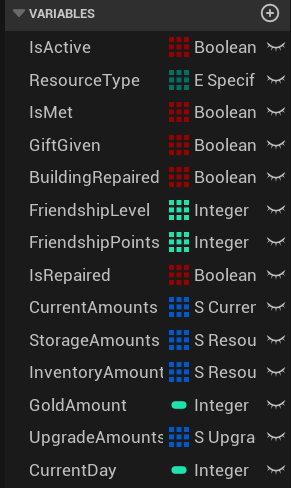
Now onto the actual saving of the game, there are 14 variables (12 arrays and 2 singles) that are saved every time the game is saved. I won’t list them all here, but the image below will show all of them and I will probably go through all of them here anyways. All of these variables can be organized into 3 groups: resources, buildings, and characters.
The resource group includes which resource is at which BP_ResourceSpawnpoint, is the BP_ResourceSpawnpoint active, the amount of resources in the player inventory, the amount of resources in the player storage, the amount of gold the player has, and the upgrades that the player has purchased. The arrays that all of these come from (other than the gold amount) are the things that are actually saved, for example, the player’s inventory amounts are individually saved, the S_ResourceAmount Struct variable “ResourceAmounts” is the only thing that is actually saved, and when it is loaded, it just writes that right back to the ResourceAmounts variable in the BP_ResourceManager. Upon loading these things back, the player inventory is repopulated from ResourceAmounts with W_InventorySlots, along with the player’s gold total. Also, all of the player’s previous upgrades are reapplied.
The buildings group just includes arrays of IsRepaired and CurrentAmounts (BuildingRepaired is part of the character group). The IsRepaired array just goes through the ordered list of repair points and sees if they are repaired, and upon loading back, it will immediately repair them if so. The CurrentAmounts saves the amount of each type of specific resource that has already been donated to each building. Since the required resource amounts aren’t changing, they don’t need to be saved and can be pulled from the instance editable RequiredAmounts array in each repair point.
Lastly, the character group stores information for each character that exists. This includes things like if they have been met before, if they were given a gift or had a home repaired and still need to be talked to for the player to see that line of dialogue, their friendship points, and their friendship level. All of these variables are simply just reapplied to each character via the ordered character list.
One last thing that is saved is the CurrentDay counter that is stored in the BP_FirstPersonCharacter. This just keeps the day the same for when the player goes to sleep.
The game gets saved whenever the player hits the quit button in the escape menu, when they go to sleep, or after every two minutes. The BP_SaveManager is responsible for saving everything to the save slot, and is also responsible for starting the loading screen, and closing it as well.
Above you can find an image of the variables that are in the save game slot.
Here are links to where you can see the important BPs mentioned in this Dev Log.
Get GGD Resource Project
GGD Resource Project
A resource gathering project!
| Status | Prototype |
| Author | GavinGameDesign |
More posts
- Final Thoughts and Credits11 days ago
- Gifts11 days ago
- Characters11 days ago
- Repair Points11 days ago
- Sleeping11 days ago
- Storage System11 days ago
- Upgrade Shop and Upgrades11 days ago
- General Shop and Selling Resources11 days ago
- Breaking Resources and Player Inventory11 days ago
Leave a comment
Log in with itch.io to leave a comment.